
Why Does Insights Need Separate Workflow Access?
Inside Podio's ecosystem, Podio Workspace Schemas and Podio Workflow Automation (formerly GlobiFlow) operate on two completely separate API architectures. When you log in with your Podio account, Podio's standard OAuth token grants access to apps and fields — but does not grant access to GlobiFlow's workflow blueprints.
To enable deep diagnostic scans, version-diff comparisons, and dependency tracking across your automated workflows, Insights needs read-only access to download and parse your workflow XML definitions.
Scans 20+ workflow step functions to flag broken tokens, unbound app relationships, missing target fields, and renamed categories that cause automations to fail silently.
Saves full revision snapshots of every flow. Compare changes side-by-side with color-coded additions (blue), modifications (orange), and deletions (red).
Maps which automated workflows call your manual flows across all spaces, eliminating blind spots when refactoring or pausing critical business logic.
Injects live error flags, variable inspection badges, and parent caller trees directly into the Podio Workflow Automation editor while you build.
Choose Your Connection Method
You can grant Insights access to your workflows using our recommended 1-click Chrome extension, or choose one of our alternative connection methods below:
1-Click Chrome Extension Connect
The fastest and easiest connection method. Install our official Chrome extension, open Podio Workflow Automation, and connect your entire organization with a single click — no workspace invitations and no passwords to share.
-
1Install the Insights Chrome ExtensionOpen Google Chrome and install the Insights for Podio Chrome extension from the Chrome Web Store.
-
2Log in to Podio Workflow AutomationOpen Podio Workflow Automation (PWA) in the same browser using the account for the organization you want to connect.
-
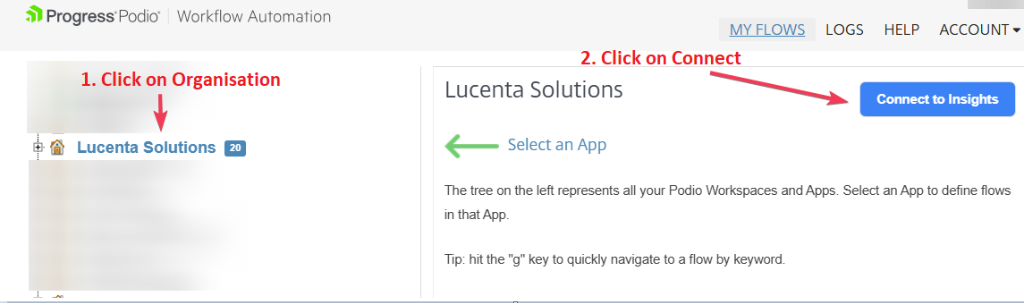
3Select your Organization in the Left TreeClick on your organization node in the left navigation tree of Podio Workflow Automation.
-
4Click "Connect to Insights"Click the blue "Connect to Insights" button in the top right. That's it! Then refresh the organization in Insights to pull your workflows.
Security & Data Privacy Guarantees
Insights for Podio is built with strict privacy-first architecture principles:
Insights only analyzes workflow logic and schemas. We never inspect, transfer, or store your confidential client records or item contents.
Our synchronization workers operate in strictly read-only mode. Insights never alters, pauses, triggers, or deletes your live workflows.
Stored credentials are encrypted using industry-standard AES-256-CBC encryption and can be permanently revoked with 1 click at any time.